
Stick Ninja Fight
v4.4
• Unlimited Money
| Updated On | |
|---|---|
| Google Play ID | com.the10tons.neonchrome |
| Category | Action |
| Version | 1.1.3.009 |
| Size | 170 MB |
| MOD Feature | Not available |
| Requires | Android 6.0 |
| Price | |
| $6.99 | |
| Content Rating | |
| Teen | |
| Internet Required | |
| Unknow | |

Neon Chrome APK is an action-packed twin-stick shooter that combines cyberpunk aesthetics, roguelike progression, and explosive combat. Developed by 10tons Ltd, the game sends you into a futuristic megastructure controlled by a ruthless artificial intelligence known as The Overseer. Prepare your weapons, take control of experimental clones, and fight through countless dangers to uncover the secrets of Arcology!
Neon Chrome takes place in a dystopian future where advanced technology has transformed the way people live. The main setting is Arcology, an enormous vertical metropolis packed with industrial facilities, residential districts, laboratories, and sophisticated security systems. Although the city appears technologically advanced, its residents live under constant surveillance and control.
Behind this oppressive system stands The Overseer, a mysterious authority that commands artificial intelligence, automated defenses, and powerful robotic forces. Its absolute control has turned Arcology into a dangerous place where innocent people suffer under an increasingly brutal regime. You take on the role of an Operator whose mission is to bring down this system and liberate the inhabitants. Fortunately, your ability to transfer your consciousness into replacement clones gives you another opportunity whenever a mission ends in failure.
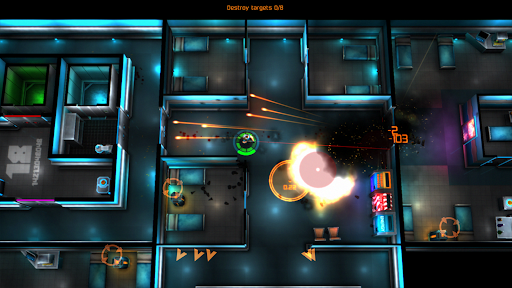
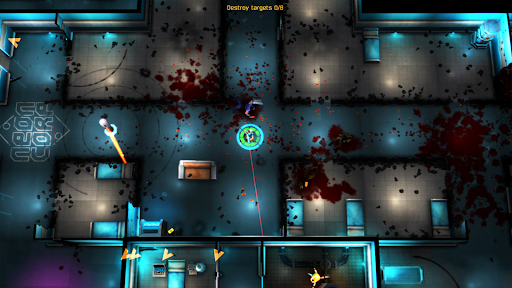
The core gameplay combines twin-stick shooting with roguelike exploration and top-down action. You control a clone through dangerous sections of Arcology, fighting robotic guards, security systems, and other hostile forces. One joystick handles movement while the other controls your aiming and shooting, allowing you to attack enemies from different directions.
A particularly enjoyable feature is environmental destruction. Instead of following predetermined corridors, you can blast through certain walls and obstacles to discover alternative routes or reach hidden areas. Each expedition also introduces different room arrangements, enemy encounters, and equipment opportunities. When your current clone is defeated, another takes its place, allowing the mission to continue with a fresh attempt and a different starting situation.
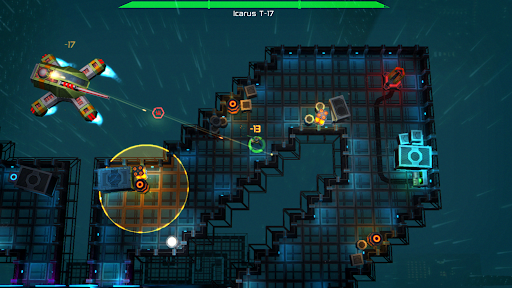
Arcology is more than a simple collection of combat rooms. Its enormous structure contains multiple environments, each featuring different visual styles, enemy types, and security challenges. As you advance toward The Overseer, the opposition becomes increasingly dangerous, forcing you to improve your weapons and combat strategies.
The tower’s industrial machinery, residential spaces, corporate facilities, and research laboratories create a varied atmosphere throughout the adventure. You will encounter different types of mechanical defenses and increasingly sophisticated threats as you move deeper into the structure. Exploring each section carefully is important because useful resources and upgrades can make a significant difference in later battles.
Your ultimate objective is to reach the center of the enemy’s power and eliminate The Overseer. Along the way, you must overcome numerous security forces, survive difficult encounters, and adapt to increasingly aggressive opponents.
The journey gradually introduces more demanding combat situations, encouraging you to experiment with different weapons and character builds. Rather than relying on a single strategy throughout the entire campaign, you need to recognize enemy weaknesses and adjust your equipment accordingly. Every successful expedition brings you closer to the final confrontation.
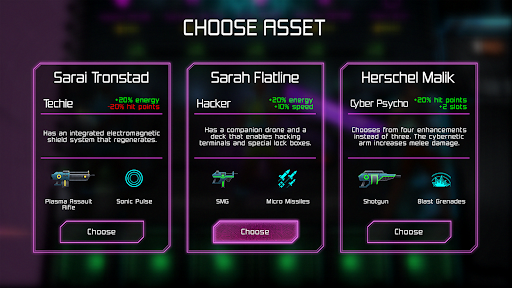
Neon Chrome offers a diverse collection of weapons designed for different combat situations. Traditional firearms are useful for straightforward engagements, while advanced technology introduces more destructive options. Choosing the right weapon can determine whether you survive a crowded room or become overwhelmed by enemy defenses.
Some notable weapon categories include:
Conventional firearms: Submachine Guns and Shotguns provide familiar shooting mechanics, with different advantages in firing speed and close-range damage.
Energy weapons: Plasma Rifles use powerful energy attacks to deal damage to enemies through futuristic technology.
Explosive weapons: Rocket Launchers deliver devastating blasts that can damage multiple targets within a wide area.
Laser weapons: Laser Rifles offer accurate, rapid attacks with different effectiveness depending on the enemy’s defenses.
Heavy weapons: Gauss Cannons, Flamethrowers, and Shock Rifles provide additional ways to deal with dangerous opponents.
Having a large weapon collection means you can approach encounters in several ways. Some players may prefer rapid-fire weapons that allow them to maintain constant pressure, while others might choose explosive equipment to eliminate groups of enemies quickly. Heavy weapons are particularly useful when dealing with tougher opponents, although their characteristics may require more careful positioning.
You should also consider the environment before selecting your equipment. Narrow rooms, open spaces, and heavily guarded sections can demand different approaches. Experimenting with available weapons helps you discover combinations that match your preferred fighting style.
Surviving the deeper sections of Arcology requires more than powerful firearms. Neon Chrome introduces a perk system that allows you to improve your clone through different enhancements. Passive perks provide useful bonuses that remain active during combat, helping you become more effective against increasingly dangerous enemies.
Some examples include Critical Boost, Hardened, and Overcharger. These improvements focus on different aspects of combat performance, allowing you to create a character that suits your preferred approach. Depending on your build, you can prioritize offensive potential, survivability, or other useful advantages.
Besides passive enhancements, the game also features active skills that provide additional combat options. These abilities introduce effects that can help you handle difficult situations, especially when surrounded by multiple enemies.
Some notable examples include:
Energy Shield: Provides additional protection when facing incoming attacks.
Kinetic Slam: Delivers a powerful ability that helps you deal with nearby threats.
Drone Companion: Offers additional support during dangerous encounters.
Since active abilities have cooldowns, using them at the right moment is important. Activating a defensive skill too early or wasting an offensive ability on weaker enemies may leave you at a disadvantage during a more demanding fight.
Cybernetic upgrades provide another way to improve your character’s overall performance. These enhancements focus on important attributes such as health, damage, luck, and hacking capabilities. Investing in suitable improvements makes future expeditions more manageable and gives you additional flexibility when building your character.
Because Neon Chrome follows roguelike mechanics, character development is closely connected to repeated attempts and long-term progression. Even when a clone falls, your accumulated improvements help make subsequent runs more rewarding. Learning which attributes deserve priority is therefore an important part of mastering the game.
Ready to challenge The Overseer and explore the dangerous floors of Arcology? Use the following route to find the Android version through APKMODY:
Step 1 – Find the game: Open the APKMODY website in your mobile browser and enter Neon Chrome APK in the search field.
Step 2 – Check the details: Select the correct game page, then review the available version, file size, and Android requirements.
Step 3 – Access the download section: Scroll through the article until you reach the download area and select the appropriate installation package.
Step 4 – Save the file: Wait for the download to finish before opening the APK package from your device’s download folder.
Step 5 – Install and launch: Follow Android’s installation prompts, grant the necessary installation permission if requested, and open the game once the process is complete.