
JUMP: Assemble
v3.0.7
• MOBA

| Updated On | |
|---|---|
| Google Play ID | com.mobile.legends.lite |
| Category | MOBA |
| Version | 2.2.23.12353 |
| Size | 140 MB |
| MOD Feature | Not available |
| Requires | Android 5.0 |
| Price | |
| Free | |
| Content Rating | |
| Teen | |
| Internet Required | |
| Required | |

Mobile Legends: Bang Bang Lite is designed for players who want to enjoy competitive MOBA battles without putting too much pressure on their Android devices. Featuring familiar heroes, classic 5v5 matches, and simplified visual effects, this lightweight version offers an alternative for users struggling with limited storage or hardware performance. Let’s explore its gameplay, available features, and the differences that make this edition worth checking out.
Mobile Legends: Bang Bang Lite is an unofficial community-developed modification that aims to make the familiar MOBA experience more accessible on lower-end smartphones. By reducing certain resources and simplifying visual elements, this version attempts to minimize storage requirements and hardware demands.
Unlike the official release from Moonton, this community-developed edition is not an authorized lightweight version. Its available features, compatibility, and update schedule may differ considerably from the original game. Players should also understand that unofficial modifications can introduce security, account, and matchmaking risks.
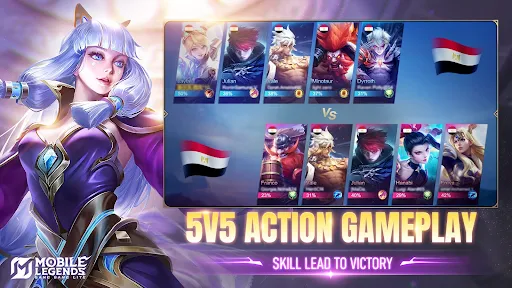
Before exploring the differences, it is worth understanding the gameplay foundation inherited from Mobile Legends: Bang Bang. The game follows the traditional Multiplayer Online Battle Arena format, where two teams of five players compete across three lanes while defending their own base and attacking the opponent’s structure. The ultimate objective is to destroy the enemy base through coordinated attacks, strategic movement, and effective resource management.
At the beginning of each match, players select heroes belonging to different combat roles, including Tank, Fighter, Marksman, Mage, Assassin, and Support. Each position contributes differently to the team, from absorbing incoming damage and initiating fights to controlling opponents or dealing sustained damage. Cooperation between teammates is essential, particularly when contesting important objectives.
Battles are generally fast-paced, with skirmishes developing during the early stages before larger team fights become increasingly common. Securing objectives such as Turtle and Lord can provide valuable advantages, helping teams establish control over the map and create opportunities to push toward the opposing base.
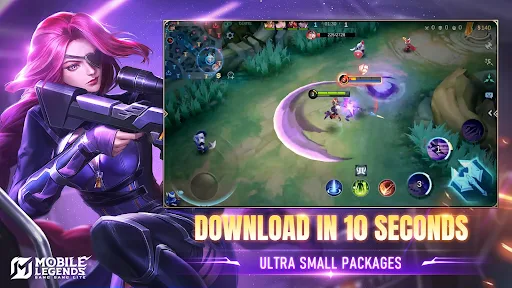
The biggest selling point of Mobile Legends: Bang Bang Lite is its attempt to reduce the game’s overall resource requirements. While the official version can occupy several gigabytes after downloading additional content and updates, the Lite modification is presented as a much smaller package, with some releases reportedly taking up less than 400MB.
Its main interface also follows a simplified design. Familiar sections such as Battle, Shop, Heroes, and Events remain recognizable, while certain animations and decorative elements are reduced. This approach aims to shorten loading times and make navigation more responsive, particularly on smartphones with limited processing power. Actual installation size and performance depend on the specific release and device configuration.
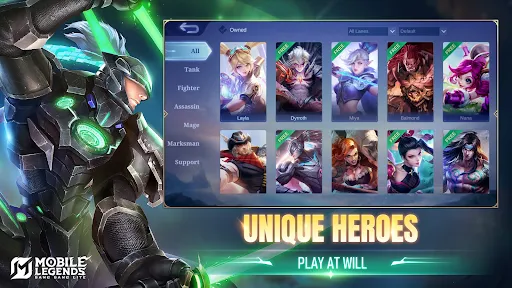
Despite its reduced presentation, Mobile Legends: Bang Bang Lite aims to retain a selection of recognizable heroes from the original MOBA experience. Popular characters such as Zilong, Layla, Miya, Balmond, and Eudora are among the familiar names associated with this edition.
Each hero comes with a distinct combat style and skill combination. Zilong specializes in chasing vulnerable opponents, while Layla and Miya focus on ranged damage. Eudora provides powerful magical attacks, whereas Balmond is better suited to close-range engagements. These different playstyles allow players to experiment with team compositions and adapt their strategies to various situations.
The familiar skill-based combat system is another important attraction. Players can still focus on timing abilities, positioning themselves correctly, and combining attacks to maximize damage. However, the actual hero roster, skill availability, and balance may vary depending on the modification’s version.
Mobile Legends: Bang Bang Lite focuses primarily on the core multiplayer experience. Depending on the particular release, players may encounter several familiar modes designed for different preferences and skill levels.
Normal Match: A casual environment for practicing hero abilities, testing builds, and becoming familiar with team coordination.
Ranked Match: A competitive format where players challenge opponents and attempt to improve their ranking.
Bot Match: An option for practicing against computer-controlled opponents before entering more demanding battles.
Custom Match: A flexible environment for arranging private games and experimenting with different strategies.
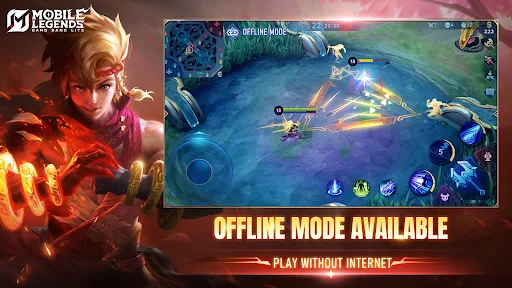
Some secondary activities, including Arcade and Brawl, may be unavailable or incomplete in certain builds. Multiplayer functionality is also not guaranteed simply because a modified client includes these mode names. Server compatibility, matchmaking support, and connection stability depend on the release being used.
Character personalization remains an appealing part of the Mobile Legends experience. The Lite modification aims to preserve selected hero skins and basic customization options while reducing some of the visual assets found in the official release.
Players familiar with Battle Points (BP) will recognize the original purchasing concept, which allows them to unlock heroes through in-game currency. Certain builds may also include limited skin selections or event-related content, although these features should not be expected to match the official version.
Another noticeable adjustment involves the character selection interface. Instead of displaying elaborate 3D presentations, some modified releases use simpler 2D portraits and reduced animations. Although the presentation is less impressive, it keeps the focus on selecting heroes and preparing for the next battle.
High-quality textures and elaborate combat effects can put considerable pressure on older smartphones. To address this problem, Mobile Legends: Bang Bang Lite uses simplified graphical elements that aim to reduce GPU workload and improve overall responsiveness.
The battlefield retains its essential layout, allowing players to recognize lanes, identify opponents, and follow team movements. Meanwhile, certain environmental details, character effects, and animations are reduced to prioritize performance over visual quality.
This approach may benefit devices with limited RAM or older processors, although stable frame rates cannot be guaranteed across all hardware configurations. Network quality, background applications, device temperature, and the specific modification also influence gameplay performance. Players should therefore treat performance figures advertised by individual releases as indicative rather than universal benchmarks.
Want to try a lighter MOBA experience on your Android smartphone? APKMODY is a place where you can look for the Mobile Legends: Bang Bang Lite APK package and review its available release information before installation.
Use the following checklist to prepare your device:
Visit APKMODY: Open the APKMODY website through your Android browser.
Locate the game: Search for Mobile Legends: Bang Bang Lite APK and access the corresponding download page.
Review the package: Check the version number, file size, compatibility details, and release information before proceeding.
Save the installation file: Select the available download option and wait for the APK package to finish downloading.
Install the application: Open the downloaded file and follow Android’s installation prompts. If required, adjust the permission allowing installations from your chosen source.
Check compatibility: Launch the application and verify whether its features, server connection, and gameplay function correctly on your device.