home chevron_right Games chevron_right Simulation chevron_right Getting Home


RV Camper Simulator
v2.4
• Unlimited Money
| Updated On | |
|---|---|
| Google Play ID | com.ArcticMeadow.GettingHome |
| Category | Simulation |
| Version | 1.1.0 |
| Size | 538 MB |
| MOD Feature | Not available |
| Requires | Android 7.1 |
| Price | |
| Free | |
| Content Rating | |
| Everyone | |
| Internet Required | |
| Unknow | |

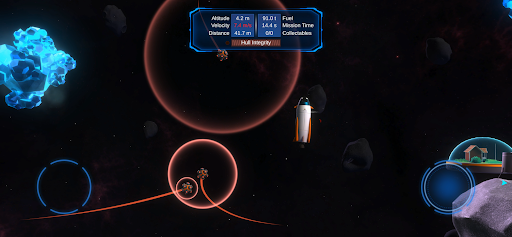
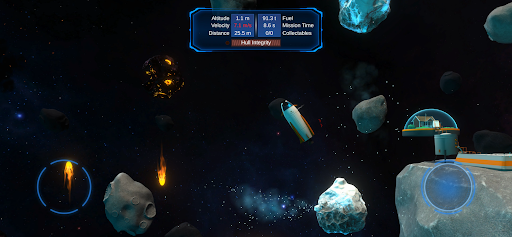
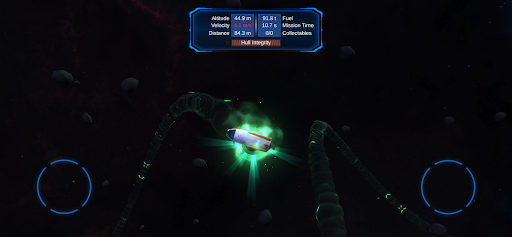
Getting Home takes you on a challenging journey through outer space, where every movement requires careful calculation and precise control. Pilot a small spacecraft, navigate dangerous obstacles, and find a safe route to the landing station using a surprisingly simple control system. If you enjoy physics-based puzzles that test your patience and coordination, this space adventure deserves your attention.
Developed by independent creator Arctic Meadow AB, Getting Home is a 3D puzzle game built around spacecraft navigation and precision landing challenges. Rather than relying on complicated controls or fast-paced combat, the game focuses on realistic movement, spatial awareness, and careful decision-making.
Available on both Google Play and the App Store, Getting Home follows a one-time purchase model on its official platforms. Its minimalist presentation hides a surprisingly demanding gameplay experience, where even a small mistake can send your spacecraft crashing into nearby objects.
Your main objective in Getting Home is straightforward: pilot your shuttle from its starting position and land safely at the designated station. However, reaching that destination requires more than simply pointing your spacecraft in the right direction. You must manage its orientation, control acceleration, and calculate movement carefully to avoid obstacles along the route.
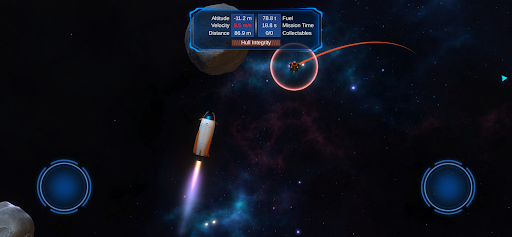
The game provides only two virtual buttons, positioned in the lower corners of the screen. Each button controls rotation in a particular direction, allowing you to adjust the spacecraft’s orientation. Pressing both buttons simultaneously activates the launch function, pushing the shuttle forward according to the direction of its nose.
Fuel management is another important consideration. Every launch consumes part of your limited fuel supply, whereas rotating the spacecraft doesn’t use any. Once the tank is empty, you lose the ability to activate another launch, making it essential to plan your movements instead of accelerating without purpose.
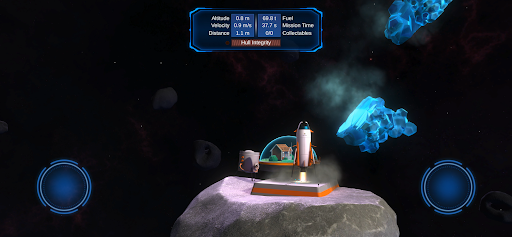
When you approach the landing station, the spacecraft automatically deploys its landing gear and begins descending toward the platform. A successful landing completes the level and rewards you with up to three stars. Your final rating depends on several factors, including landing distance, completion time, and remaining fuel. Even if you earn fewer stars, completing a stage is enough to unlock the next challenge. However, crashing will reset your spacecraft to its original starting position, requiring you to attempt the entire level again.
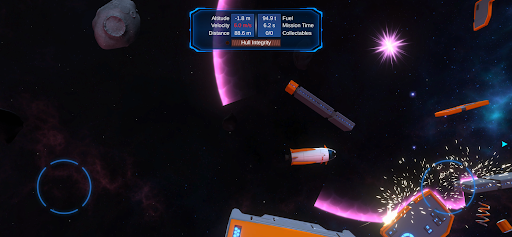
Navigating through space isn’t entirely safe, as many objects scattered throughout the levels can collide with your spacecraft. To represent its physical condition, Getting Home includes a Hull Integrity statistic that decreases whenever the shuttle experiences damaging impacts. If this value reaches zero, the spacecraft breaks apart, resulting in an unsuccessful attempt.
Interestingly, collision damage depends directly on your spacecraft’s current speed. A high-speed impact is particularly dangerous and may destroy your shuttle immediately, while a slower collision gives it a better chance of surviving additional damage. This creates an important tactical element: reducing velocity before passing through narrow spaces or approaching obstacles.
Instead of focusing exclusively on avoiding every object, you should learn how to manage momentum and minimize the force of potential impacts. Understanding this mechanic becomes increasingly important when navigating complicated routes with limited room for maneuvering.
Physics is the foundation of almost everything you do in Getting Home. Although the game features just two primary controls, its microgravity simulation makes spacecraft movement considerably more complicated than it initially appears. Every rotation and launch generates momentum, meaning your shuttle won’t immediately stop moving simply because you release the buttons.
For example, rotating in one direction creates angular momentum that continues even after you stop pressing the corresponding control. The same principle applies to forward movement. Since there is no dedicated brake button, you must activate the launch function in the opposite direction to counter existing velocity and slow your spacecraft down. Learning how to use these opposing forces is essential for maintaining control.
Landing also involves physical reactions that can catch inexperienced players off guard. When the landing gear touches the platform, the resulting impact generates an upward reaction force. If your approach is too fast, the spacecraft may bounce back into the air. An uneven landing can also cause the shuttle to tilt, making it harder to stabilize afterward. Therefore, successful navigation requires you to reduce speed, align the spacecraft properly, and approach the platform at a controlled angle.
Getting Home is available through official mobile app stores as a paid title. If you want to install the Android edition, you can use the following instructions to find the game and complete the purchase:
| Step | What To Do |
|---|---|
| 1. Open Google Play | Launch the Google Play Store on your Android device. |
| 2. Search for the game | Enter Getting Home in the search field and locate the correct listing by Arctic Meadow AB. |
| 3. Check the purchase details | Review the game’s description, compatibility, and displayed price before proceeding. |
| 4. Complete the purchase | Select the purchase option and follow Google’s payment instructions. |
| 5. Install the game | Once the transaction is complete, tap Install and wait for the download to finish. |
| 6. Start playing | Open Getting Home from your app library and begin your first spacecraft landing mission. |