
Satisfying Coloring
v6.4
• Unlocked VIP

| Updated On | |
|---|---|
| Google Play ID | air.com.lunime.gachastudio |
| Category | Casual |
| Version | 2.1.2 |
| Size | 62 MB |
| MOD Feature | Not available |
| Requires | Android 9 |
| Price | |
| Free | |
| Content Rating | |
| Everyone 10+ | |
| Internet Required | |
| Required | |

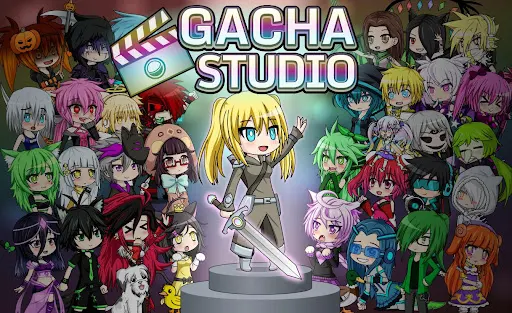
Gacha Studio APK brings anime-inspired character creation, dress-up challenges, and collectible pets together in a colorful chibi world. You can customize everything from hairstyles and facial details to outfits, accessories, and photo poses, giving each character a personality of its own. Whether you enjoy fashion design or collecting adorable companions, APKMODY is a convenient place to explore the Android version of this creative game.
Gacha Studio takes the familiar concept of collecting random rewards and gives it a creative purpose. Players use in-game resources to spin for items, characters, backgrounds, decorations, and pets. Each attempt brings the possibility of discovering something new, although the rewards are based on chance and not every spin guarantees a rare item.
What makes the experience different is how you use those collections afterward. Instead of simply gathering characters, you get to style them, combine different fashion pieces, and create scenes that reflect your personal taste. The gacha system becomes a way to expand your wardrobe and studio options, giving you more creative possibilities as you continue playing.
When starting out, you can select one of six preset characters, then choose basic equipment and a pet to accompany your adventure. Battles in the arenas provide gems and other rewards that help you strengthen your characters, unlock additional companions, and access more gacha opportunities. This progression system gives you a reason to keep participating in matches rather than focusing exclusively on appearance customization.
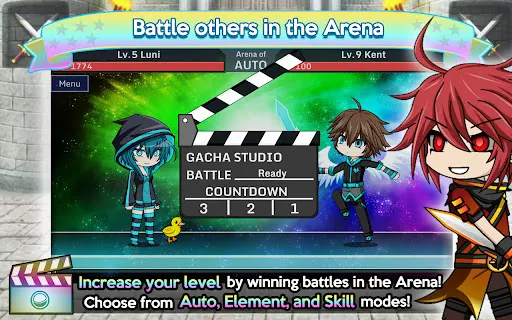
The combat itself is relatively brief, usually lasting from several seconds to around a minute. You can face AI-controlled opponents or take part in competitive encounters, depending on the available mode. Pets also play an active role, so equipping them with suitable weapons and accessories is important if you want to improve your performance in the arena.
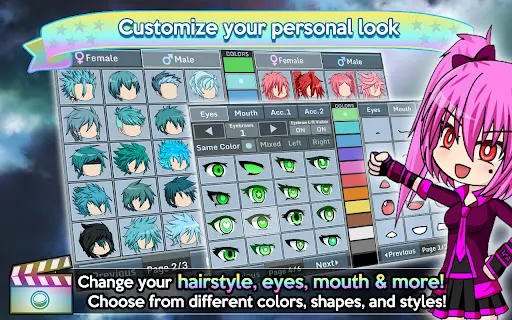
Gacha Studio is built around cute chibi-style characters with oversized heads and expressive features. Its customization tools let you experiment with a broad selection of clothing, hairstyles, accessories, and other visual details. You can adjust hair and eye colors, change facial elements, and combine different fashion pieces to create distinctive boys and girls.
The wardrobe offers plenty of room for experimentation, whether you prefer casual outfits, stylish combinations, or cosplay-inspired appearances. You can also recreate the look of characters from other anime or Gacha titles using the available options. With so many combinations to explore, designing a new appearance can become an enjoyable activity in its own right.
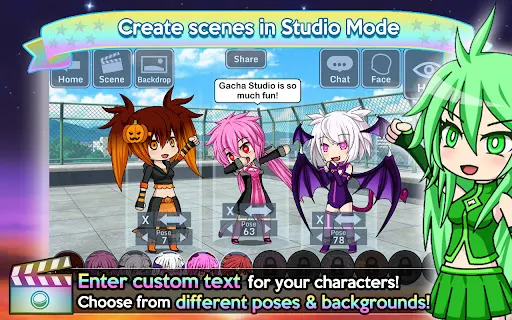
Once your character is ready, Studio Mode gives you a space to arrange poses and build memorable pictures. Choose from different character positions, select a background, and add speech bubbles or messages to give the scene more personality. You can create anything from simple fashion portraits to playful interactions between several characters.
This mode makes the game more than a conventional dress-up experience. Rather than leaving your creations in the customization screen, you can present them through carefully arranged scenes and share your favorite designs with other players. It’s a useful feature for anyone who enjoys visual storytelling or creating anime-style content.
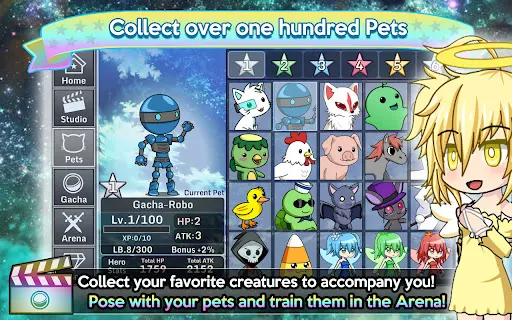
Pets are another important part of the Gacha Studio collection. The game features more than 100 companions for players to discover, train, and customize. These creatures can join your character in photos or accompany you into arena challenges, adding another layer of collection and progression.
Different arena formats, including Auto, Element, and Skill modes, offer varied ways to use your characters and pets. You can also work toward achievements and leaderboard positions through Google Play features. If you prefer a quieter experience, offline solo play lets you enjoy parts of the game without needing a constant internet connection, although online competition and community-related functions require connectivity.
Gacha Studio combines several activities that appeal to fans of anime-inspired games: character styling, random item collection, pet raising, photography, and short battles. You don’t have to focus on just one aspect. Spend time creating outfits, collect new companions, or enter the arena whenever you feel like testing your team.
Its chibi presentation and accessible customization tools make it easy to experiment without needing advanced design skills. The option to play offline is also useful when you simply want to work on your characters without joining online matches. For players who enjoy expressing their creativity through virtual characters, Gacha Studio offers plenty of ways to make each creation feel personal.
To install the game from APKMODY, use the following process:
| Step | What to do |
|---|---|
| 1 | Open your browser and go to the APKMODY website. |
| 2 | Enter Gacha Studio in the site’s search bar. |
| 3 | Select the matching game page and review the available APK information. |
| 4 | Press the download link and allow the file to finish downloading. |
| 5 | Locate the APK in your device’s Downloads folder and tap it to begin installation. |
| 6 | If Android blocks the installation, grant permission for your browser or file manager to install apps from that source, then try again. |