home chevron_right Games chevron_right Simulation chevron_right Ellipse: Rocket Pioneer

Japan Postman Moto Simulator
v68
• Unlimited Money
| Updated On | |
|---|---|
| Google Play ID | com.Astrelix.Ellipse |
| Category | Simulation |
| Version | 1.0.4 |
| Size | 183 MB |
| MOD Features | Unlocked |
| Requires | Android 8.0 |
| Price | |
| Free | |
| Content Rating | |
| Everyone | |
| Internet Required | |
| Unknow | |

Have you ever wanted to design your own rocket and send it beyond Earth’s atmosphere? Ellipse: Rocket Pioneer turns that idea into an interactive aerospace simulation where you take control of rocket construction, flight adjustments, and space exploration. Combining engineering mechanics with practical scientific concepts, the game challenges you to build functional spacecraft, complete increasingly demanding missions, and discover what it takes to reach the stars.
Developed by Starwelds, Ellipse: Rocket Pioneer focuses on the technical aspects of rocket engineering rather than traditional action-oriented gameplay. You are responsible for assembling a spacecraft, managing its weight, controlling its movement, and ensuring that it can complete its assigned mission.
The experience introduces several interconnected systems, so understanding how individual components work together is essential. A rocket must be assembled properly before launch, while its trajectory and fuel consumption need to be considered during flight. These mechanics create a simulation that rewards experimentation, careful planning, and an interest in aerospace technology.
The main objective in Ellipse: Rocket Pioneer is to launch your rocket, control its trajectory, and complete the requirements of each mission. The game features eight missions, with challenges becoming more demanding as you progress.
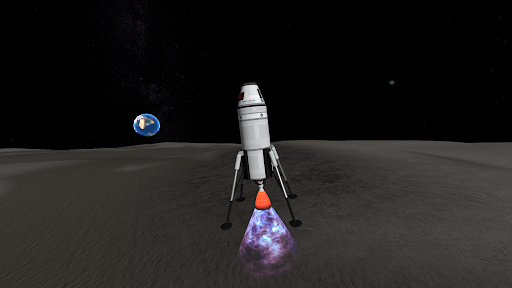
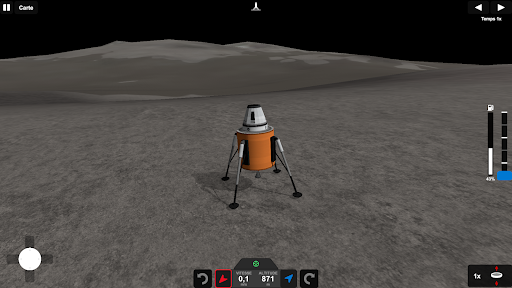
Early assignments introduce the fundamental mechanics. You will learn how to launch a rocket, detach components when necessary, and guide the remaining spacecraft toward a safe landing. These initial stages provide a useful introduction to the controls before more complicated objectives become available.
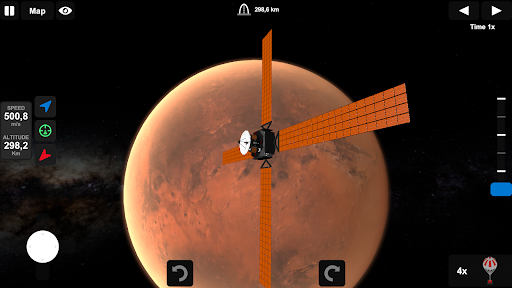
Later missions require greater precision and planning. You may need to travel around Earth or venture toward other planets, making rocket design and flight management increasingly important. A spacecraft that performs well in a simple launch may not be suitable for a longer journey, so you will need to adjust your construction strategy according to each mission’s requirements.
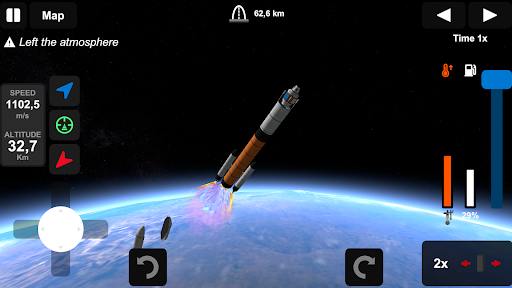
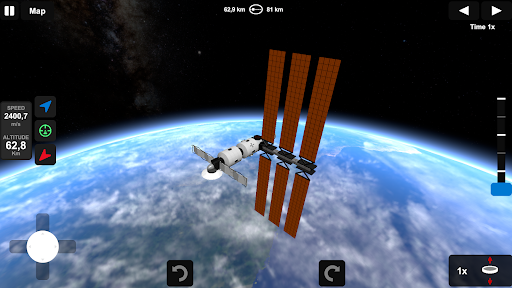
Before every flight, you will be positioned at the launch station with your assembled rocket. The interface provides several virtual controls that allow you to manage different stages of the journey.
The main launch button is located in the lower-right corner of the screen. You can also use it to detach rocket stages when their fuel has been exhausted. Removing unnecessary sections reduces the spacecraft’s weight, helping the remaining structure continue its journey.
Two directional arrow buttons at the bottom of the screen let you adjust the rocket’s orientation. These controls are important when correcting its trajectory or preparing for a particular flight maneuver. Meanwhile, the map interface displays your current position and projected path, allowing you to monitor the journey more effectively.
Another useful option is the time acceleration feature. By using the control next to the clock in the upper-right corner, you can speed up certain parts of the flight. This is especially convenient when testing longer missions or waiting for a spacecraft to reach its next destination.
One of the most interesting aspects of Ellipse: Rocket Pioneer is its construction system. Instead of choosing from a collection of completely finished spacecraft, you can assemble a rocket using individual components and customize its overall structure.
Entering assembly mode takes you to a dedicated engineering workspace. Its interface resembles common 3D design software, providing tools for selecting, positioning, and modifying different rocket parts. This approach gives you considerable freedom to experiment with different configurations.
To add a component, select the hammer icon along the left side of the screen. The parts menu will then appear on the right, where you can choose the elements needed for your spacecraft. Drag your selected components into the workspace and attach them to the central axis, which acts as a reference for positioning the rocket’s structure.
If a particular part is no longer needed, simply hold it and drag it toward the trash can icon. However, remember that every additional component contributes to the rocket’s total weight. Adding more parts is not always beneficial, especially when you are trying to build a lightweight spacecraft capable of completing a demanding mission.
After placing the necessary parts, you can fine-tune their positions using the component movement interface. Activate this tool through the button displaying three arrows on the left side of the screen.
When you select a component, three colored directional arrows appear around it. These controls allow you to move the selected part along different axes, making it easier to align components and connect them properly.
Pay close attention to how each section is attached to the main structure. Components that remain disconnected from the rocket may be removed before launch, potentially affecting your design. Therefore, check the connections carefully before considering your construction complete.
The movement tools are particularly useful when building more complicated spacecraft. Even small positioning adjustments can make a difference to the final structure, so take your time to inspect the rocket from different angles when necessary.
Ellipse: Rocket Pioneer also allows you to modify the dimensions of individual components. During the component selection process, choose a part in the engineering workspace to access its adjustment options.
The customization interface includes two main sliders:
Radius: Changes the width or overall size of the selected component.
Height: Adjusts the component’s length.
Certain parts also provide color customization, allowing you to create a spacecraft that matches your preferred appearance. These options add a visual design element to the engineering experience.
However, customization is not purely cosmetic. Changing a component’s dimensions also affects its mass, which contributes to the total weight of your rocket. This means you should consider the functional consequences of every adjustment rather than focusing exclusively on appearance.
The modified version of Ellipse: Rocket Pioneer is advertised with an unlocked feature.
Unlocked: Provides access to unlocked content or functionality included in the specific MOD release.
The exact scope of this feature may depend on the modified build. Check the release information before installing to understand which content is available.
Ellipse: Rocket Pioneer offers a distinctive mobile simulation experience by placing rocket engineering and spaceflight mechanics at the center of its gameplay. Its construction tools, adjustable components, and mission-based progression provide plenty of opportunities to experiment with different spacecraft designs. If you enjoy science-oriented games or have an interest in aerospace technology, this title is worth checking out.
Instead of rushing into installation, use the following release-comparison method to find a suitable version on APKMODY:
Search by the complete game title
Open APKMODY in your browser and enter Ellipse: Rocket Pioneer in the search field. Check the result’s title and developer information to make sure you have found the correct game from Starwelds.
Compare the available releases
If the page displays more than one version, look at their version numbers and publication details. A newer release may include changes to gameplay or compatibility, so do not assume that every package offers the same experience.
Confirm the advertised MOD feature
Review the description to see whether the selected package includes the Unlocked feature. Pay attention to any additional notes explaining which content or functions are available in that particular build.
Check device compatibility and file information
Before downloading, examine the Android requirements and file size. Make sure your device meets the stated requirements and has enough free storage for installation.
Download and verify the APK
Select the appropriate download option and wait for the file to finish downloading. Locate it in your Downloads folder and check that its name and version correspond to the release you selected.
Install and start your first mission
Open the APK and follow the installation prompts provided by Android. Once installation is complete, launch the game, familiarize yourself with the engineering workspace, and begin assembling your first rocket.