

Jewel Coloring
v1.24.1
• No Ads
| Updated On | |
|---|---|
| Google Play ID | com.jeffprod.cubesolver |
| Category | Puzzle |
| Version | 5.1.1 |
| Size | 27 MB |
| MOD Feature | Not available |
| Requires | Android 7.0 |
| Price | |
| Free | |
| Content Rating | |
| Everyone | |
| Internet Required | |
| Unknow | |

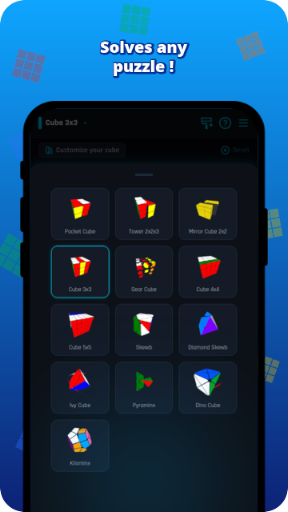
Solving a Rubik’s Cube might look intimidating when you first pick one up, but the right guidance can make the challenge much easier. Cube Solver turns this classic puzzle into a more approachable experience by calculating solutions, explaining individual moves, and helping users explore different cube patterns. Whether you are learning the basics or trying to improve your solving technique, this lightweight app offers a practical way to understand the puzzle without getting stuck.
Developed by LOLAGRE and first released in 2018, Cube Solver is designed to help users solve Rubik’s Cubes through calculated algorithms and clear instructions. Think of it as a digital assistant that examines your cube, determines the moves needed, and guides you through the process one step at a time.
The app has attracted a substantial audience, with more than 50 million downloads on Google Play. Its appeal comes from a straightforward approach: instead of requiring users to memorize complicated algorithms immediately, it provides accessible tools for solving, practicing, and experimenting with cube arrangements.
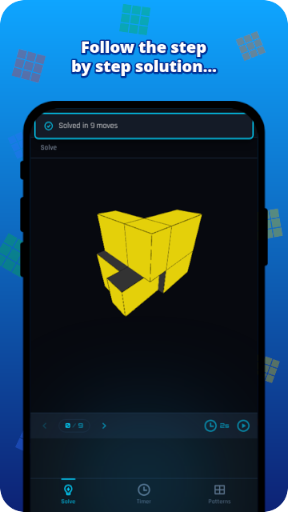
One of Cube Solver’s main strengths is its use of the Kociemba algorithm, a well-known method for finding efficient solutions to the standard 3x3x3 Rubik’s Cube. After receiving the cube’s current configuration, the app calculates a sequence of moves that leads to the solved state. Depending on the scramble, the resulting solution commonly takes around 19–22 moves.
You can also adjust how quickly the instructions appear or move through them manually. This flexibility makes the feature useful for different purposes. If you only need to solve a scrambled cube, you can follow the instructions quickly. If you want to understand the process, take your time with each move and observe how the cube changes.
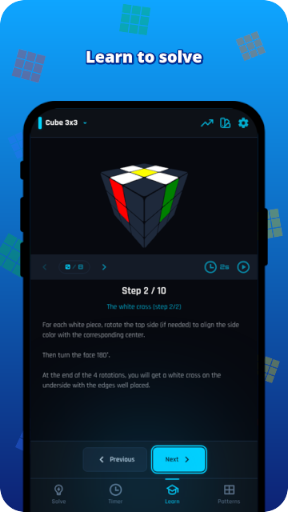
Beginners often struggle because they do not know which layer to work on first or how individual turns affect the rest of the cube. Cube Solver makes this learning curve less overwhelming by displaying the required moves in sequence.
As you repeat the process, you can start recognizing familiar arrangements and understanding how different pieces fit together. For instance, you may notice how completing the first layer creates a foundation for solving the middle and final layers. Rather than memorizing every move immediately, you gradually become familiar with the logic behind the solution.
The app is particularly helpful when practicing with a physical cube. You can follow the displayed instructions, perform each turn yourself, and check the result before moving forward. With enough repetition, you may eventually recognize common situations without needing assistance.
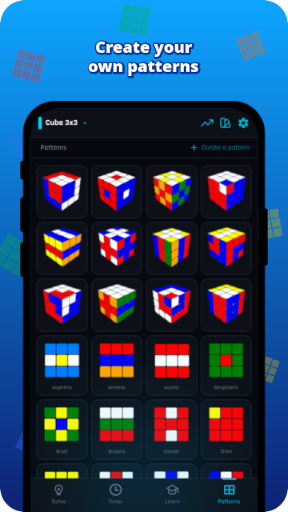
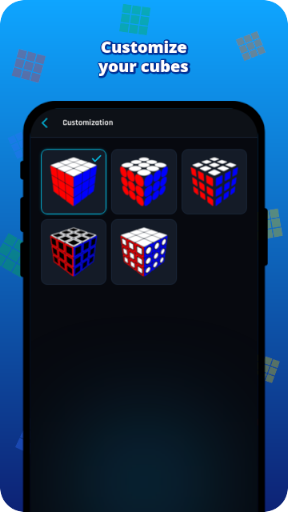
Solving a Rubik’s Cube is not the only way to enjoy it. Many players like creating recognizable arrangements, experimenting with symmetrical designs, or reproducing patterns that look impressive when viewed from different angles. Cube Solver supports this creative side through a feature that lets you customize the colors on individual squares.
You can manually select colors to build your preferred arrangement. A checkerboard design is one familiar example, while other possibilities include crosses, symmetrical layouts, and combinations of contrasting colors. The interface gives you room to experiment without having to manipulate a physical cube for every idea.
Once your design is ready, Cube Solver can calculate the moves required to transform a standard solved cube into your chosen pattern. This adds a practical element to the creative process: you can build a design digitally, then use the generated instructions to reproduce it with a real cube.
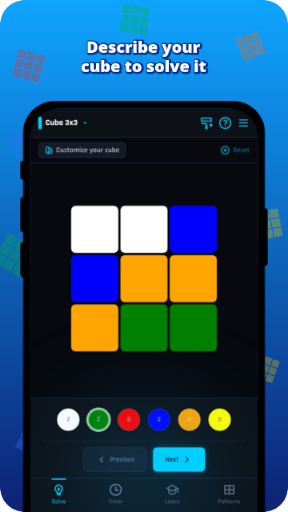
Manually identifying every square can become tedious, especially when you are dealing with an unfamiliar arrangement. Cube Solver offers another way to provide the cube’s current state by entering its configuration through the available description or input method. The app then uses that information to reconstruct the arrangement and calculate a solution.
This approach is useful in several situations:
No camera scanning available: Enter the cube configuration manually when you cannot use a camera-based input method.
Solving from a recorded state: Keep a description of the cube’s arrangement and enter it later when you have time to work through the solution.
Algorithm practice: Use character-based configurations for exercises involving Rubik’s Cube notation, mathematics, or computer science.
The quality of the solution depends on the accuracy of the information you enter. A misplaced color or incorrectly described face can produce an invalid configuration, so it is worth checking your input before requesting a solution. Once everything matches your physical cube, the app can take care of the calculation.
Speedcubing communities often rely on established techniques such as CFOP and Roux. These methods are effective, but learning their algorithms and recognizing different cases can take considerable practice. Cube Solver offers a simpler starting point by focusing on generating a solution rather than requiring users to master a particular speedsolving system.
Its step-by-step presentation makes it easier to follow the process without studying a large collection of notation beforehand. You can concentrate on understanding the current move, applying it correctly, and observing its effect on the cube. This is especially helpful for casual players who want to solve puzzles without committing to an intensive training routine.
However, the app is best viewed as a learning companion rather than a replacement for practice. Following its instructions can help you complete a cube, while developing your own solving ability still requires repetition and familiarity with the underlying techniques.
Cube Solver is also appealing because it does not demand much storage space. Its installation size is approximately 8MB, making it a lightweight option for Android devices with limited available storage. You do not need a powerful phone to access its core solving features.
Another useful advantage is offline functionality. Once installed, the app can perform its main solving tasks without requiring a Wi-Fi or mobile data connection. This means you can practice at home, during a commute, or wherever an internet connection is unavailable. Its simple interface also keeps the focus on the cube rather than unnecessary distractions.
Cube Solver is a practical choice for anyone who wants to understand the Rubik’s Cube without spending hours figuring out every move independently. Its optimized calculations, customizable patterns, and beginner-friendly instructions make the puzzle more accessible while leaving room for experimentation. Although regular practice remains essential if you want to become a faster solver, the app provides a useful starting point for building confidence.
To install the Android version through APKMODY, follow this short process:
Find the app: Open the APKMODY website and search for Cube Solver.
Check the listing: Review the available version information and make sure the package is compatible with your Android device.
Save the APK: Select the download option to obtain the installation file.
Complete installation: Open the downloaded file, allow installation from the relevant source if Android requests permission, and follow the on-screen prompts.
Start solving: Launch Cube Solver and enter your cube configuration to begin exploring its features.