home chevron_right Games chevron_right Simulation chevron_right Airport Security Simulator 3D


Lumber Chopper
v55.6.0
• Simulation






| Updated On | |
|---|---|
| Google Play ID | com.fm.airport.security.guard |
| Category | Simulation |
| Version | 0.9 |
| Size | 196 MB |
| MOD Feature | Not available |
| Requires | Android 7.0 |
| Price | |
| Free | |
| Content Rating | |
| Teen | |
| Internet Required | |
| Unknow | |

Have you ever wondered what happens behind the airport security checkpoint before passengers board their flights? Airport Security Simulator 3D lets you experience this responsibility firsthand through an entertaining simulation game. Inspect luggage, verify travel documents, identify suspicious passengers, and make important decisions to keep the airport safe.
Airport Security Simulator 3D is a casual simulation game that puts you in charge of passenger screening and security operations. Instead of playing as a traveler, you’ll work on the other side of the checkpoint, where every passenger must be inspected before being allowed to continue their journey.
The game combines luggage searches, document verification, prohibited-item detection, and occasional confrontations with troublesome individuals. Your performance determines how much money you earn, which can then be invested in better equipment and useful upgrades.
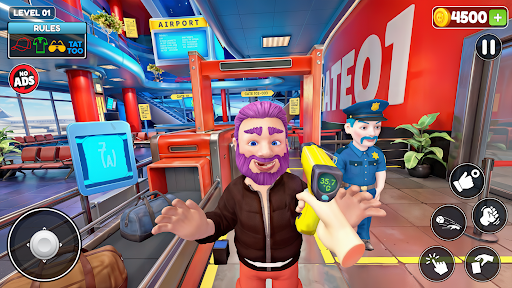
The main gameplay follows a straightforward inspection process. Passengers arrive continuously at your checkpoint, bringing suitcases, personal belongings, and travel documents that need to be checked. Your responsibility is to examine their luggage, identify suspicious objects, and decide whether they should be allowed through.
You’ll use various tools placed around the inspection station to complete your duties. Different situations require different actions, so paying attention to the available equipment is essential. Once a level ends, your performance is evaluated and you receive an in-game monetary reward.
The money you earn can be spent on additional equipment, including scanners that make certain inspection tasks easier. As you progress, you’ll have more opportunities to improve your working setup and handle increasingly demanding situations.
Airport Security Simulator 3D isn’t simply about opening suitcases and checking their contents. You also need to understand the airport’s security regulations and recognize which objects passengers are allowed to carry.
A particularly useful reference is the Rules board, usually displayed near the upper-left corner of the screen or around the baggage conveyor. It explains which items are permitted and which are prohibited. Check this information before making decisions because overlooking a restricted object can affect your performance.
When you discover forbidden items, use the grab button in the lower-right corner to remove them from the luggage. However, some passengers may attempt to conceal objects under their clothing. If their behavior raises suspicion, you can perform a more detailed inspection to uncover hidden belongings.
Not every encounter is peaceful, either. Certain individuals may become aggressive or threaten the security checkpoint. In these situations, the game provides a punch button that allows you to subdue troublesome passengers and regain control of the area.
Besides the standard airport checkpoint, the game introduces another activity called Club Security. Instead of inspecting airline passengers, you’ll work as a nightclub bouncer responsible for checking guests before they enter the venue.
The basic principles remain familiar: inspect individuals, identify dangerous objects, and prevent suspicious people from entering. However, the different setting gives the experience a fresh atmosphere and changes the context of your security duties.
You can also switch between three environmental settings: Night Time, Day Time, and Cloudy. These weather and lighting variations provide visual diversity, helping the same gameplay environment feel less repetitive.
Airport Security Simulator 3D doesn’t aim to deliver photorealistic airport environments. Instead, it uses a lightweight 3D art style with simplified objects, colorful surroundings, and exaggerated character proportions.
The most noticeable feature is the character design. Passengers have relatively short bodies, oversized heads, and exaggerated facial features. Their eyes, noses, and mouths are deliberately stylized, creating a humorous appearance that matches the game’s casual nature.
This visual approach also makes important objects easier to recognize during inspections. You don’t need an advanced device to appreciate the presentation, and the uncomplicated graphics help keep the gameplay accessible.
Although the gameplay focuses primarily on visual inspection, sound contributes significantly to the overall atmosphere. Background audio includes airport announcements, machinery operating around the checkpoint, and other environmental effects that help recreate a busy terminal.
Passenger reactions also make the experience more engaging. Depending on your decisions, people may complain when you confiscate their belongings or express gratitude when you allow them to pass. These small audio details add personality to otherwise repetitive inspection tasks.
Aircraft-related sounds and background announcements further reinforce the airport setting, making each shift feel like part of a functioning transportation environment.
If you’re looking for a casual simulation game that doesn’t require complicated controls or demanding graphics, Airport Security Simulator 3D is worth exploring. Its combination of luggage inspections, passenger interactions, and nightclub security activities offers a relaxing alternative to traditional action games.
To get the Android version, try this installation method:
Open APKMODY in your browser and search for Airport Security Simulator 3D.
Enter the game’s page and check the available APK releases.
Compare the version information and select the package compatible with your Android device.
Before downloading, review the file size and any additional installation notes displayed on the page.
Once the download finishes, open the browser’s download manager and select the APK file.
If your phone displays an installation restriction, open the relevant Android security settings and authorize the source you’re using.
Return to the downloaded package, confirm the installation, and wait for the process to finish.
Find the new game icon in your app drawer, launch it, and start managing your first security checkpoint.