home chevron_right Apps chevron_right House & Home chevron_right Realtor.com Real Estate


Redfin Real Estate
v653.0
• House & Home



| Updated On | |
|---|---|
| Google Play ID | com.move.realtor |
| Category | House & Home |
| Version | 27.7.0 |
| Size | 73 MB |
| MOD Feature | Not available |
| Requires | Android 8.0 |
| Price | |
| Free | |
| Content Rating | |
| Everyone | |
| Internet Required | |
| Required | |

Realtor.com Real Estate APK makes it easier to explore the American property market directly from your Android device. Whether you are planning to buy a home, find a rental, or simply compare available properties, the application brings together detailed listings and useful search tools in one place. With customizable filters, property photos, map views, and neighborhood information, you can research potential homes before deciding which ones deserve a closer look.
Real estate decisions often involve significant financial commitments, so having access to reliable information is essential. Realtor.com provides a digital platform for exploring residential properties across the United States, helping users narrow down their choices according to their budgets and personal requirements.
Housing needs vary considerably between individuals and families. Some people are searching for their first home, while others want to move closer to work, find a larger living space, or invest in another property.
The US real estate market offers a wide range of options, but comparing them can be time-consuming. Prices, locations, property conditions, and neighborhood characteristics all influence whether a particular home is suitable.
Realtor.com helps simplify this research process by bringing property information into a single application. Instead of browsing numerous unrelated sources, users can explore available listings and compare important details through a more organized interface.
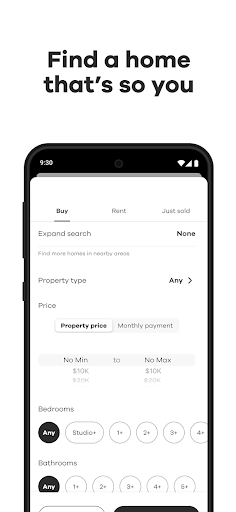
Searching for a property becomes much easier when you can define exactly what you need. Realtor.com provides several filtering options that help users reduce a large collection of listings to a more manageable selection.
The application allows you to search for properties using criteria such as location, price range, property type, and the number of bedrooms or bathrooms. These options are particularly useful when you already have a clear idea of the home you want.
You can also combine multiple filters to refine your results. For example, someone looking for a family home might prioritize a specific neighborhood, a minimum number of bedrooms, and a price limit that fits their budget.
Adjusting these criteria helps eliminate listings that do not match your requirements. It also makes comparing different properties more efficient, especially when exploring a competitive housing market.
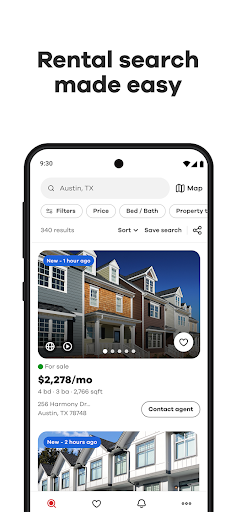
Realtor.com supports searches for different types of real estate, including homes for sale and rental properties. This flexibility makes the application useful for people with different housing plans.
Whether you are relocating, searching for a temporary place to live, or comparing long-term purchase options, you can explore listings according to your current priorities. Saving interesting properties also helps you return to promising options without repeating the entire search.
Visiting every property in person is not always practical. Travel distances, work schedules, and the number of available listings can make traditional house hunting difficult.
Realtor.com provides property photos that allow users to examine different parts of a home before arranging a physical visit. You can look at rooms, kitchens, bathrooms, outdoor spaces, and other visible features to get a better initial impression.
Some listings may also include virtual tours or interactive viewing experiences. Where available, these features provide a more detailed way to explore the property remotely, helping you decide whether it deserves further consideration.
Not every listing includes the same media options. The availability of virtual tours, 3D views, and other visual materials depends on the information supplied for each property.
Visual information becomes especially valuable when you are considering several properties at once. You can compare room layouts, interior finishes, outdoor areas, and general presentation before deciding which homes to visit.
This approach helps you use your time more effectively. Rather than arranging appointments for every interesting listing, you can first remove options that clearly do not meet your expectations.
A home’s appearance is only one part of the decision-making process. Buyers and renters also need to understand the surrounding area, available facilities, and other factors that may influence everyday life.
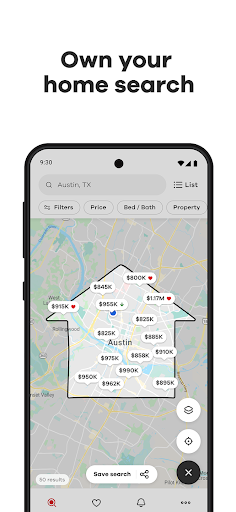
Realtor.com includes map-based browsing tools that help users understand where individual listings are located. Instead of looking at property addresses separately, you can explore their positions in relation to nearby roads, neighborhoods, and local destinations.
This is useful when comparing homes in different parts of a city. A property with an attractive price may be less convenient if it is far from workplaces, schools, or essential services.
Map views provide another perspective on the search process, helping you consider location alongside the property’s own features.
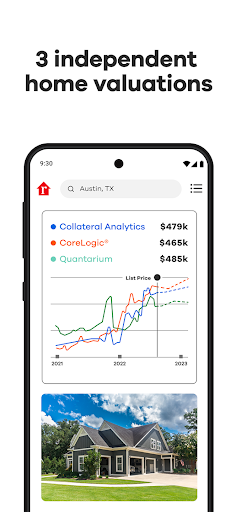
Property listings may contain details such as estimated home values, asking prices, floor plans, construction characteristics, and available amenities. Depending on the property and data provided, users may also find information about nearby schools, transportation, and other neighborhood features.
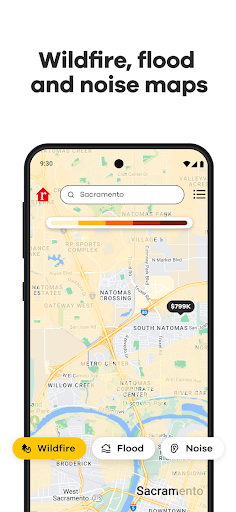
Some listings or related resources provide additional environmental and local context, such as flood-risk information or noise-related details. These factors can help users identify questions that deserve further investigation.
However, listing information and estimates should be treated as reference material rather than guaranteed assessments. Property data can change, and important details should always be confirmed with the seller, landlord, or an appropriate professional before making a commitment.
The property market changes frequently. New homes become available, existing listings are modified, and some properties are removed after being sold or rented.
Realtor.com helps users keep track of available listings and review information as it changes. By revisiting saved properties and checking updated search results, you can stay informed about homes that match your requirements.
This is particularly useful when searching in areas where desirable properties attract considerable attention. Having an organized list of potential options makes it easier to compare new opportunities with those you have already considered.
A good property search involves more than finding an attractive price. You should also consider the home’s condition, location, potential expenses, and suitability for your long-term plans.
Realtor.com brings several useful details together so that you can conduct preliminary research before contacting the relevant parties. Its tools help organize the information, but they do not replace property inspections, financial advice, or independent verification.
If you want to explore US property listings from your smartphone, you can look for the Android installation package through APKMODY. Use this checklist to complete the process:
Open the download source: Visit the APKMODY website using your Android browser.
Locate the application: Search for “Realtor.com Real Estate” and select the matching result.
Inspect the package: Check the displayed version, file size, release details, and device compatibility.
Start downloading: Use the download link provided on the application page and allow the APK file to finish saving.
Review installation permissions: Open your device settings if Android requests permission to install an application from your browser or file manager. Only proceed when you trust the source.
Complete the setup: Find the downloaded APK, tap the file, and follow the instructions displayed by Android.
Begin exploring properties: Launch Realtor.com, configure your search preferences, and browse homes that match your requirements.