home chevron_right Apps chevron_right Personalization chevron_right OnePro (Dark) – Icon Pack

STOKiE PRO – Stock Wallpapers
v4.4.1
• Unlocked
| Updated On | |
|---|---|
| Google Play ID | com.eatos.onedarkpro |
| Category | Personalization |
| Version | 1.6.0 |
| Size | 60 MB |
| MOD Feature | Not available |
| Requires | Android 7.0 |
| Price | |
| $1.49 | |
| Content Rating | |
| Everyone | |
| Internet Required | |
| Unknow | |

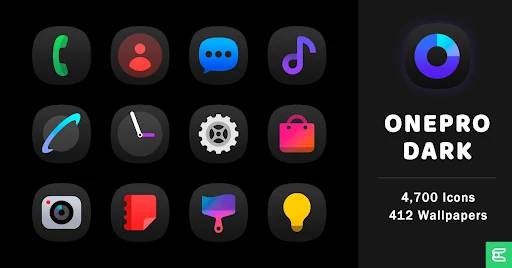
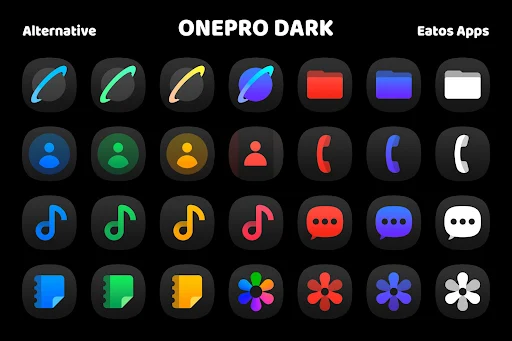
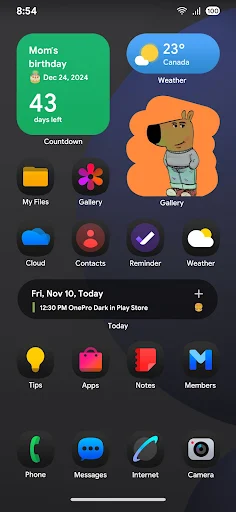
OnePro (Dark) – Icon Pack APK transforms ordinary application icons into a sleek collection inspired by Samsung’s One UI 7 design language. Featuring thousands of dark-themed icons alongside carefully selected wallpapers, this personalization tool gives Android users more freedom to customize their home screens. Developed by Eatos, the premium icon pack is an appealing option for anyone who enjoys minimalist visuals and consistent dark aesthetics.
A smartphone’s interface says a lot about its owner’s preferences, so changing the default appearance can make everyday interactions more enjoyable. OnePro (Dark) – Icon Pack focuses on visual consistency, combining dark icon designs with attractive backgrounds to create a more polished home screen.
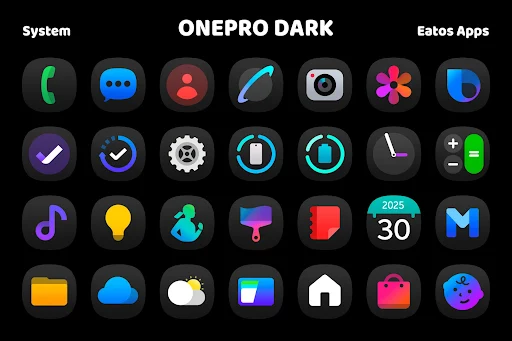
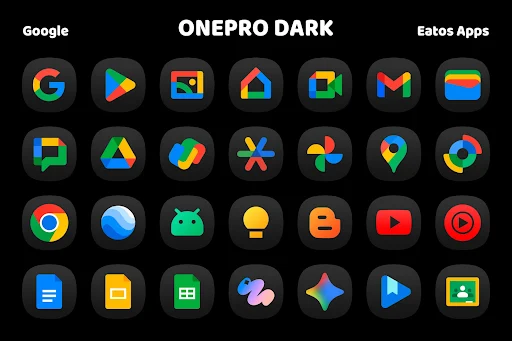
One of the biggest highlights of this application is its extensive icon collection. According to the developer, the library includes more than 4,470 designs covering popular social platforms, communication tools, utilities, games, and system applications.
Each icon follows a predominantly dark visual direction, helping maintain a consistent appearance across your device. To make browsing easier, the collection is organized into different categories, including System, Google, Misc, and Date. You can preview individual designs before applying them, making it easier to find suitable replacements for your frequently used applications.
Icons are only one part of a personalized interface. OnePro (Dark) – Icon Pack also includes a wallpaper collection featuring backgrounds inspired by various Samsung devices and software releases.
Some of the notable themes available in the library include:
Galaxy S25: Wallpapers inspired by Samsung’s flagship smartphone series.
S24 Series: Background designs associated with the Galaxy S24 lineup.
One UI 7: Visuals that complement Samsung’s latest interface design language.
Galaxy Z Flip: Wallpapers inspired by Samsung’s foldable phone collection.
Galaxy Tab S6: Background options originally associated with Samsung’s tablet lineup.
These backgrounds give you more room to experiment with different combinations. Pairing a suitable wallpaper with matching icons can create a cleaner and more unified home screen.
Unlike applications that automatically replace system icons, OnePro (Dark) – Icon Pack works through compatible Android launchers. This means you need an appropriate launcher to apply the downloaded designs to your home screen.
The application supports several popular options, including Nova, Action, ADW, Holo, Moto, OnePlus, and Pixel launchers. Once you have installed a compatible launcher, open its customization settings, locate the icon pack section, and select OnePro (Dark). Your application shortcuts should then adopt the new appearance where supported.
If your device’s default launcher does not recognize this icon pack, switching to another supported option is a practical alternative. Keep in mind that launcher compatibility may vary depending on the Android version and device manufacturer.
Even with thousands of available designs, some applications may not have dedicated icons in the current collection. This is particularly common with newly released games, niche utilities, or less popular services.
To address this gap, OnePro (Dark) – Icon Pack includes an icon request system that allows users to suggest additional designs. First, grant the necessary permission to access the installed application list. Next, open the Request section to view applications that do not currently have matching icons. Select the ones you want to submit, choose the available submission method, and send your request to the developer. The team can then review these suggestions and consider including the requested designs in a future update.
A good icon pack should offer more than attractive individual designs. Consistency, compatibility, and ongoing development also influence the overall experience. Here are some advantages and drawbacks worth considering.
OnePro (Dark) – Icon Pack combines an extensive design library with practical customization tools. Its main strengths include:
Modern visual identity: Dark surfaces and carefully designed details create a sophisticated appearance.
Extensive coverage: More than 4,470 icons provide replacements for many commonly used applications.
Complementary wallpapers: Multiple background collections help users build a coordinated interface.
AMOLED-friendly aesthetics: Dark designs work particularly well with AMOLED displays and system-wide dark themes.
Regular development: The developer can expand the collection and address missing icons through updates and user submissions.
Launcher integration: Compatible launchers make it possible to apply the designs without manually replacing every shortcut.
Although the application offers plenty of customization options, certain limitations may affect your experience:
No dynamic icons: Clock and calendar designs generally remain static instead of displaying live information.
Uneven design consistency: A few older icons may look different from newer additions in the collection.
Manual request process: Submitting missing icon suggestions requires several steps, which may confuse first-time users.
Launcher dependency: Devices using unsupported default launchers may need additional software to apply the designs.
Incomplete coverage: Some application shortcuts may retain their original appearance if matching icons are unavailable.
You can get OnePro (Dark) – Icon Pack through APKMODY and install it on your Android device. Follow this alternative setup walkthrough to prepare the application and start customizing your interface.
Step 1: Access the APKMODY download page
Open your preferred web browser, visit APKMODY, and search for OnePro (Dark) – Icon Pack. Make sure you select the correct application before proceeding.
Step 2: Save the installation package
Check the available release information and tap the download option. Wait until the APK file has been saved to your device.
Step 3: Complete the installation
Open your Downloads folder, locate the APK package, and tap it to begin installation. If Android displays a security prompt, review the source and allow the required installation permission before continuing.
Step 4: Prepare a compatible launcher
Launch the application and check its supported launcher list. Install a compatible option, such as Nova Launcher, if your current home screen does not support third-party icon packs.
Step 5: Apply the dark icon theme
Open your launcher’s appearance settings, navigate to the icon pack selection menu, and choose OnePro (Dark). You can now browse the available designs and enjoy your refreshed home screen.