
Hole.io
v2.59.3
• Unlocked




| Updated On | |
|---|---|
| Google Play ID | com.superevilmegacorp.spellfire |
| Category | Action |
| Version | 0.23.1 (149928) |
| Size | 746 MB |
| MOD Feature | Not available |
| Requires | Android 6.0 |
| Price | |
| Free | |
| Content Rating | |
| Everyone 10+ | |
| Internet Required | |
| Unknow | |

Catalyst Black APK takes multiplayer action into a fantasy world where advanced firearms, magical abilities, and monstrous transformations collide. Build a personalized loadout, coordinate attacks with your squad, and turn the tide of battle by unleashing a powerful Primal form. If you enjoy team-based combat with plenty of tactical options, explore this action-packed experience through APKMODY.
Catalyst Black creates a distinctive setting that blends mystical powers with technology-inspired weaponry. Characters wield modern firearms alongside supernatural abilities, producing a combat experience that feels different from traditional fantasy MOBAs. Its colorful environments and fast-moving battles establish the game’s energetic atmosphere from the moment you enter the arena.
At the center of each match is teamwork. You control a character, join other players, and work together to overcome the opposing squad. Winning requires more than dealing damage: positioning, choosing the right equipment, and recognizing opportunities to support teammates all influence the outcome. The straightforward objective makes it easy to understand, while the variety of combat options gives experienced players room to develop their own strategies.
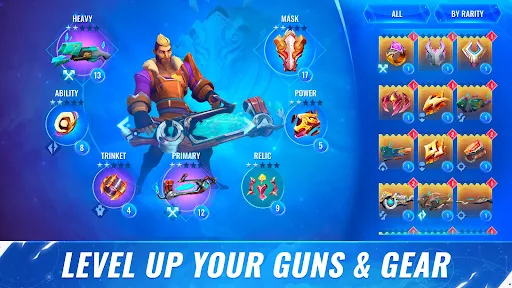
Catalyst Black offers extensive customization through its combination of weapons, abilities, and equipment. Its arsenal includes more than 33 firearms, 27 abilities, and 17 trinkets, providing numerous ways to shape your character’s performance. Rather than forcing everyone into the same approach, the loadout system encourages experimentation with different combinations.
You might prefer attacking enemies from a safe distance, rushing into close-range encounters, or supporting your team with abilities that influence the battlefield. Your selected equipment determines much of how your character performs, so choosing a balanced setup is important. Individual objectives and rewards also give you reasons to keep playing, unlock additional gear, and refine your preferred build.
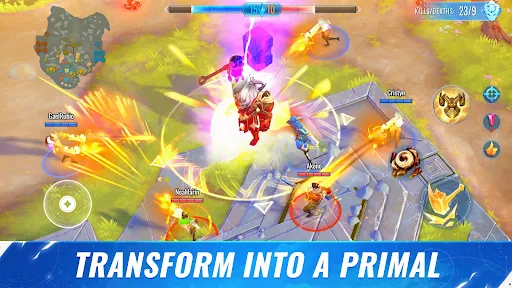
One of Catalyst Black’s defining features is its transformation mechanic. By equipping a Primal Mask, your character can temporarily change into a powerful monster known as a Primal. This isn’t simply a visual alteration; the transformed form brings a different set of combat capabilities that can dramatically change your approach to an encounter.
Primal forms deliver powerful attacks and distinctive abilities, making them especially useful when a battle reaches a critical point. Timing matters, however. Activating the transformation at the right moment can help you pressure opponents, disrupt their formation, or support your teammates during a difficult fight. Learning when to use this power becomes an important part of mastering the game.
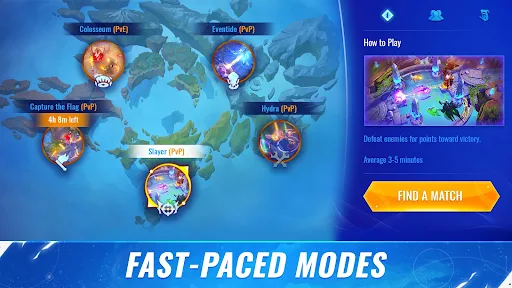
Catalyst Black provides several ways to experience its combat system, including PvE and PvP activities. Players can enter battles with different objectives, face challenging encounters, or compete against other teams. Some modes also support large-scale matches of up to 12 versus 12, creating chaotic encounters where coordination becomes essential.
The available activities include familiar formats such as Capture the Flag and Core Rush. Each mode has its own victory conditions, so simply defeating opponents isn’t always enough. You may need to secure objectives, protect important areas, or coordinate attacks around your team’s immediate priorities. Switching between modes helps keep the experience varied while encouraging you to adapt your loadout and tactics.
Even with powerful weapons and a Primal transformation, charging into every fight without a plan can put your team at a disadvantage. Players need to pay attention to enemy movements, communicate their intentions, and cooperate when contesting important objectives. A well-timed attack from several teammates is often more effective than individual attempts to dominate the battlefield.
The large team formats make this especially noticeable. With multiple opponents moving across the arena, battles can change direction quickly. Understanding your role and supporting the squad are essential if you want to turn individual combat strength into a consistent team advantage.
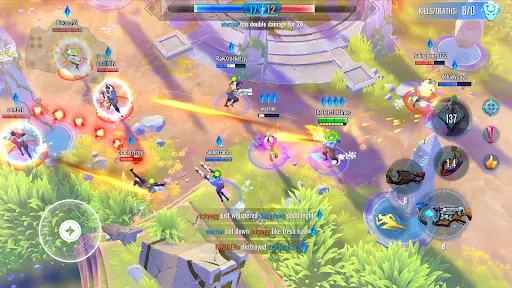
Catalyst Black uses colorful 3D environments to bring its fantasy setting to life. The arenas feature detailed surroundings, while weapon attacks, magical effects, and Primal transformations create plenty of visual activity during combat. Explosions and ability animations add impact to encounters, making large-scale battles feel intense without relying on a traditional side-scrolling perspective.
The angled top-down camera provides a broad view of the battlefield, helping you track nearby opponents and observe how team fights develop. This perspective also makes it easier to judge movement and choose an approach when several enemies are attacking at once. Energetic sound effects and background audio reinforce the pace of combat, although the mix can become quite busy during particularly crowded encounters.
If you want to install Catalyst Black through APKMODY, use this short guide:
Before installing, make sure your device has enough free storage and that you’re choosing a compatible APK file.
Navigate to APKMODY in your Android browser and search for Catalyst Black.
Open the game’s dedicated page to check the available release information.
Select the APK download option and save the installation package to your device.
Once the download finishes, open your file manager and locate the saved APK.
Tap the package to begin setup. If Android displays a security prompt, allow installation from that source in your settings.
Return to the installer, finish the process, and launch the game.